Categorization
PCG (Plan comptable général)
Now let’s implement the second step of our pipeline: Categorization. As explained in the Introduction section, we aim to categorize invoices into PCG accounts. This can be achieved by using an Advanced RAG pipeline, utilizing definitions extracted from a PCG PDF file, which can be found online.
You can find the PCG PDF file here.
Bellow is the general process of the Categorization pipeline :
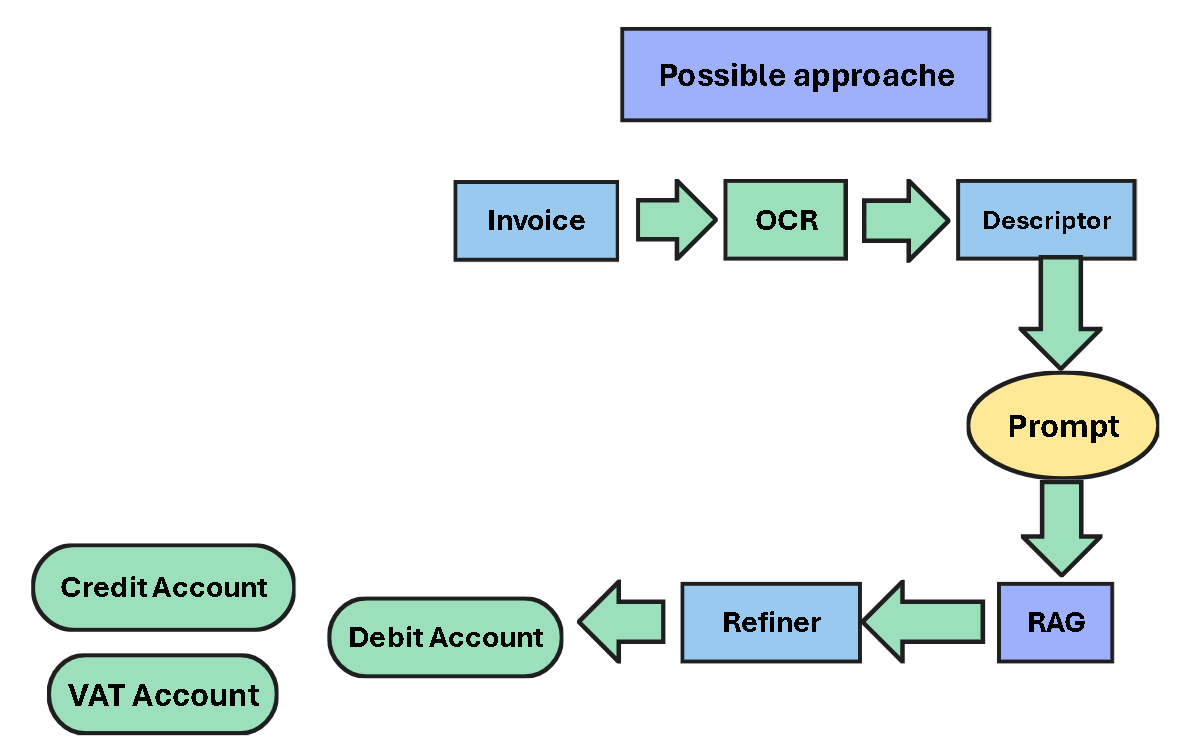
1. Descriptor
The Descriptor is a Large Language Model (LLM) responsible for:
Generating a simple analysis of the invoice.
Identifying the nature of the products/services.
Guessing the Debit Account.
2. RAG (Retrieval-Augmented Generation)
The RAG contains definitions of PCG accounts.
The Retriever will fetch the candidate accounts.
The Refiner will determine the appropriate Debit Account based on the Prompt.
The Prompt holds all the analysis generated by the Descriptor.
The possible Credit Account and VAT Account can be defined based on the PCG file.
1.Data Preparation
If you consult the previous PCG file, you notice that is not editable, it’s a bunch of scanned images. To be able to use these definitions we need to digitize and clean them.
Note
From a quick search on the internet about Payment Invoices you find the most relevant Classes is the PCG file are :
Classe 2 : Comptes d’actif immobilisé (page 18-27 in PCG file)
21 IMMOBILISATIONS EN NON-VALEURS
22 IMMOBILISATIONS INCORPORELLES
23 IMMOBILISATIONS CORPORELLES
Classe 6 : Comptes de charges (page 85-101 in PCG file)
61 CHARGES D’EXPLOITATION
So we focused only on these two classes and their accounts.
We extract only intreasted pages from PCG General to PCG file.
1.1 Digitization
We used Marker Engine implemented in the top of Surya OCR to convert our PCG file into Markdown format.
The official Github repository of Marker can be found here.
1.2 Cleaning
To clean the result Markdown file we need to remove :
Tables (because they are not usefull for our purpose)
Classes and Sub Classes (because we are intreasted only in the Accounts)
After this the cleaned markdown file can be converted into json then to csv format so it will be easy to work with.
The final desired output locks like this :
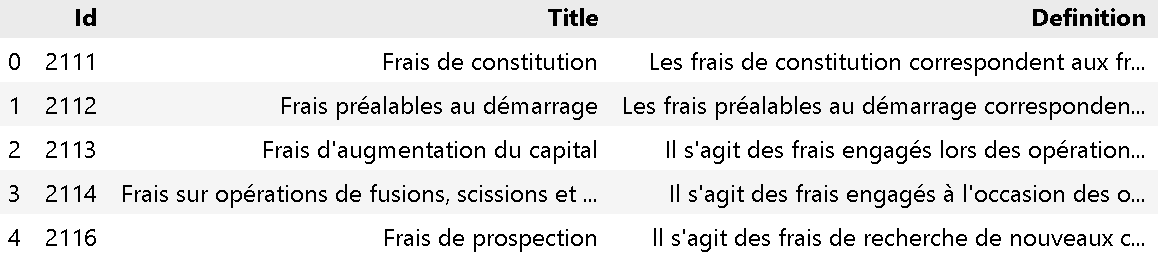
You can find the CSV file here.

2.Raw Definitions
To understand why we need to refine the definitions extracted from the PCG file, we take here an example of a invoice.
We run an PaddleOCR on a Lydec invoice.
The resulting text passs to Llama3.1-8b to generate a simple analysis (prompt).
Then we took 3 condidates definitions one of them is the right one. (account 6125)
We embedd the definitions with the prompt and we mesure the similarities.
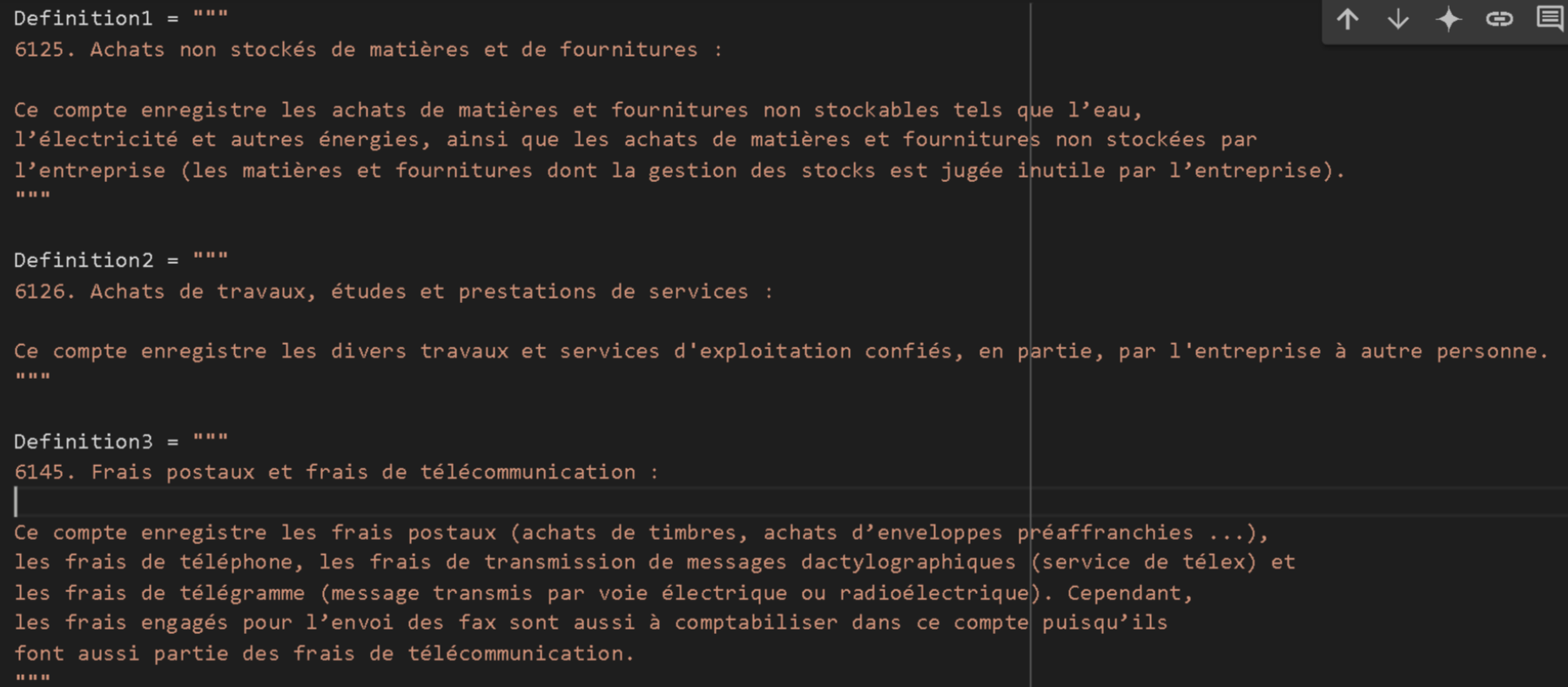
Here is the result of the similarities :
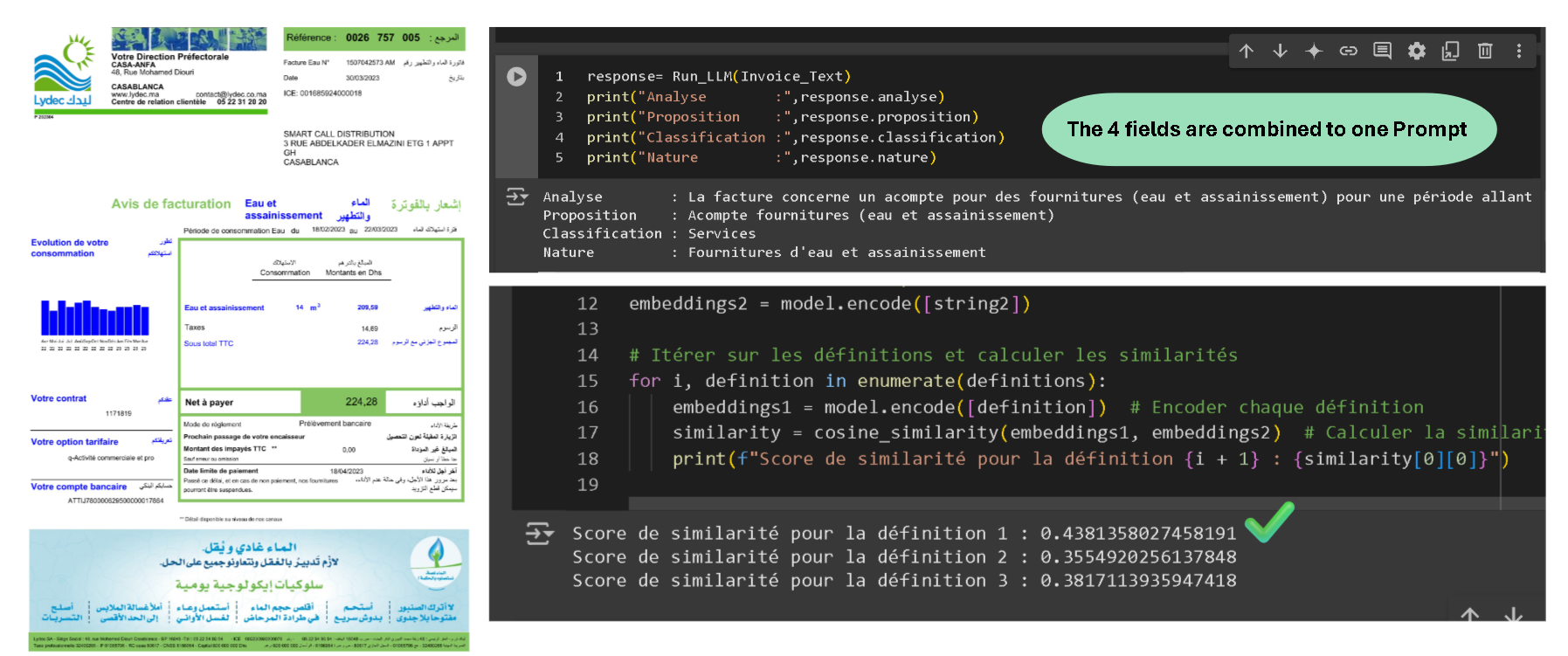
You notice that the similarities are close to each other, indicating a not reliable retrieval process.
3.Different Approaches
Enhancing this retrieval process can be done by:
Refining the definitions with keywords and examples.
Benchmarking multiple embedding models and choosing the best one.
Fine-tuning the embedding model for our use case.
4.Evaluation Strategy
To test these approaches we need first to an evaluation dataset.
4.1 Grounding Truth
We create a small dataset of 34 invoices.
Run Llama3.1-8b on each invoice to generate a simple analysis (prompt).
Manually select the right account ID.
We save all in a csv file.
Why Manually ?
Because we already test GPT-4o on this task but it dosn’t identify the right account correctly.
Example of the csv file :
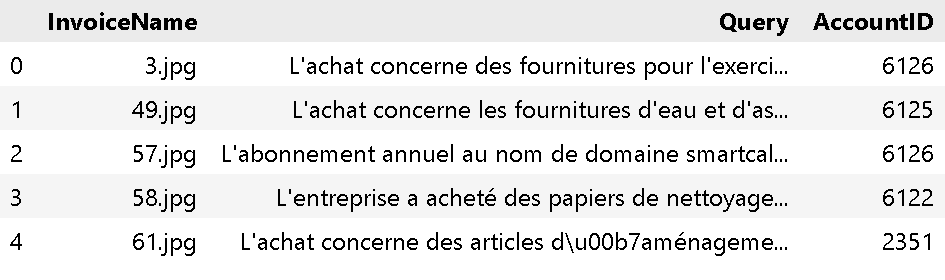
You find bellow a Colab notebook showing how to create your Evaluation dataset and you can acces direcrly to a Queries.csv file here.
4.2 How to bechmark
A good retrieval process should return the definition (Chunk) of the appropriate account In addition to high similarity with the Invoice-Prompt (Query).
For the 3 approaches we can do the following :
Build a ChromaDB with our definitions.
For each Query from Queries.csv retreive the top 5 similar definitions with their Account IDs as Metadata.
If One of the retreived Accounts IDs correspond to the correct ID , we take the Similarity Score as evaluation metric for this retrveivement.
We do the same for all the Queries and we take the average of the Similarity Scores as final RAG_Quality Score.
5.Raw definitions ⚡ Refined definitions
5.1 How to refine the definitions
That the easy part we use for this GPT-4o-mini free api from github marketplace.
We prompt GPT-4o-mini with the old definition and we request adding keywords and examples to the definition.
The implimentation code found here in colob notebook.
5.2 Evaluation results
We build tow ChromaDbs one with Raw definitions and one with refined definitions. Then we apply our Evaluation Strategy on each of them.
We use as an Embedding model all-MiniLM-L6-v2.
We can observe the results bellow :
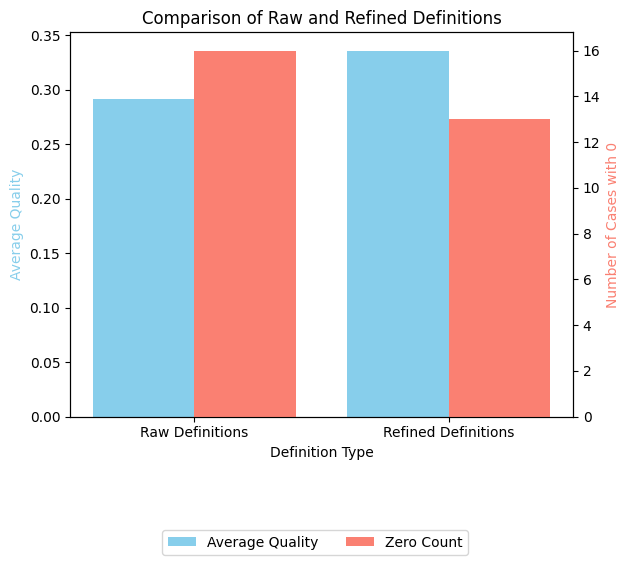
With the refined definitions we got a better RAG_Quality Score of 0.33 comparing to the 0.29 obtained with the raw definitions.
With the refined definitions we got less cases of Unretrieved-correct-definition
You can test by yourself this with the colab notebook bellow.
6.Benchmark Multiple Embedding Models
Here we will test multiple embedding models to see which one is the best. We used the same Evaluation Strategy as in the previous section.
Hint
Use this Embedding models LeaderBoard to find quickly the best embedding models, go to Retrieval then select French.
Pay attention to the Memory Usage(fp32) metric is the required amount of memory to run the Embedding model.
You can also go here to find more Embedding models.
We build a ChromaDB with each Embedding model and we apply our Evaluation Strategy on each of them.
The table below shows the results of the benchmarking :
Embedding Model |
Average Quality |
Number of Zeros |
|---|---|---|
Alibaba-NLP/gte-multilingual-base |
0.4264 |
12 |
dangvantuan/french-document-embedding |
0.5758 |
8 |
hkunlp/instructor-large |
0.5796 |
12 |
thenlper/gte-large |
0.5922 |
11 |
thenlper/gte-large-zh |
0.3880 |
16 |
Alibaba-NLP/gte-large-en-v1.5 |
0.4025 |
16 |
Lajavaness/bilingual-embedding-large |
0.4639 |
5 |
Alibaba-NLP/gte-Qwen2-1.5B-instruct |
0.5149 |
5 |
We highly recommend re-implementing this benchmarking because new embedding models are continually being added to the HuggingFace Hub.
7.Fine-tuning the Embedding Model
You need first to construct a Synthetic Dataset with the refined definitions using GPT-4o-mini free api from github marketplace.
We prompt the LLM with the refined definition and we ask for 30 real-world scinarious.
Then we push our datset to a HuggingFace Dataset.
We fine-tune the embedding model on this dataset.
Unfortunately, after evaluation of the fine-tuned model, we found that the RAG_Quality Score is not improving but getting worse. That can be caused of :
Bad dataset quality.
Bad Hyperparameters tuning.
May be using a dataset of only Positive examples can give good results.(We heightly recommend to test that).
The resluts after fine-tuning the embedding model can be found here :
Embedding Model |
Average Quality |
Number of Zeros |
|---|---|---|
Noureddinesa/Invoices_french-document-embedding |
0.2933 |
14 |
Noureddinesa/Invoices_bilingual-embedding-large |
0.3632 |
10 |
Noureddinesa/Invoices_gte-multilingual-base |
0.3055 |
14 |
The colab nootebook for Synthetic Dataset and Fine-tuning can be found here :
Hint
You can refer to our dataset here.
8.Final Pipeline
After testing all these approaches, we decide to use two embedding models for two Retrievers in our RAG pipeline :
thenlper/gte-large and Lajavaness/bilingual-embedding-large , they are the best in our benchmarking.
The final pipeline looks like this :
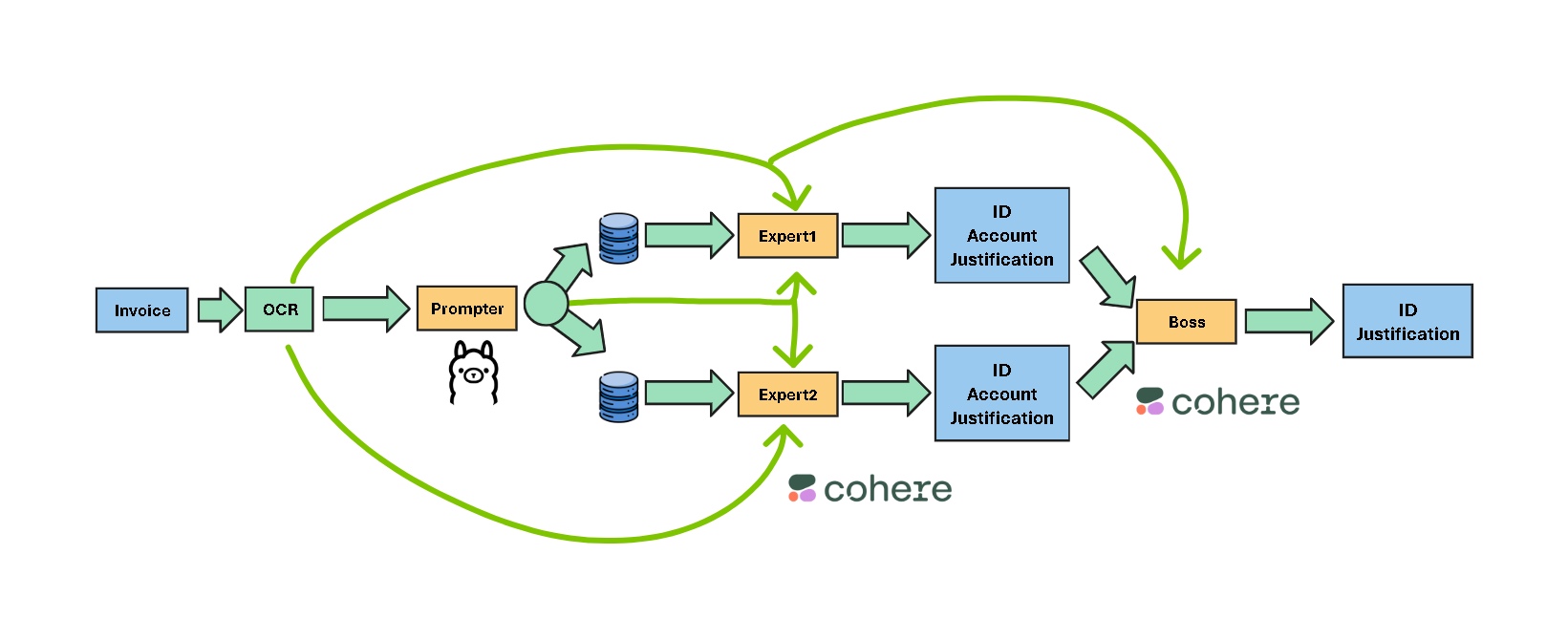
Prompter :
Llama3.1-8b for generating the prompt describing the invoice.
Experts :
thenlper/gte-large for retrieving the candidate definitions with their Accounts Ids and titles as Metadata from the first ChromaDB.
The Expert1 decide then what is the appropriate Debit Account based on the Prompt, OCR text, and the retrieved definitions.
Expert2 performs the same but with the second ChromaDB and the Lajavaness/bilingual-embedding-large.
Boss :
We used aya-expanse:8b from Cohere AI because it performed good for the Boss task.
The Boss will decide the final Debit Account based on the two Debit Accounts proposed by the Experts and Refering to the OCR text.
The final output is structered in a JSON format with keys {ID,Justification}.
Justification is just for diagnostic purposes we are intrested only in the Debit Account ID.